Wardrobe Vision: a closet you photograph once
Every wardrobe app asks you to photograph your clothes. The interesting part is what this one refuses to do afterwards.
Short answer
Wardrobe Vision catalogues clothes you photograph on an iPhone, cutting each garment out on-device, then lets you browse the same wardrobe in three dimensions on Apple Vision Pro. It stores everything locally with no account and no AI styling, and unlocks unlimited items for a one-off 19.99 dollars.
On this page
Wardrobe apps fail at the same step. Cataloguing a wardrobe takes an evening, the app wants a photograph of all ninety items, and by garment thirty the exercise has stopped feeling like organisation and started feeling like data entry for somebody else's benefit.
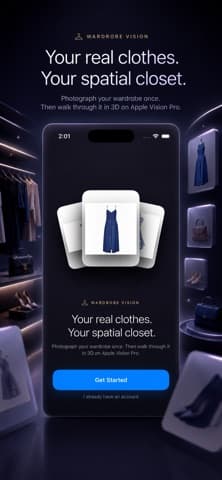
Wardrobe Vision is an iPhone app that catalogues clothes you photograph, lifts each garment onto a clean background on the device, and then — on Apple Vision Pro — lets you walk through the same wardrobe as a space. The unusual thing in its listing is not a feature. It is a refusal.
The headline feature is the absence of AI
Most apps in this category lead with a stylist bot. This one leads with not having one, and states it plainly: no stylist bots, no generated outfits, no data mining. Outfits are assembled by you, from clothes you own.
That is a real positioning choice rather than a missing feature, and it follows from where the data lives. The listing says photos and wardrobe stay on the device, with no cloud upload, no tracking, and no account required. Background removal runs on-device. The whole thing works offline.

Local storage has a cost the listing does not spell out. Data that never leaves the device is data with no backup. A lost phone is a lost wardrobe, and a catalogue representing several evenings of photography deserves a thought about that before you build it.
What does the Vision Pro version add?
Three immersive layouts, according to the listing: Gallery Wall, Floating Shelves and Hologram Orbit. You inspect a garment on a floating rack, build outfits in space, and browse the full catalogue at a scale a phone grid cannot show.
Sync between the two is direct device-to-device over the local network, with no iCloud and no account. Capture on the iPhone, and pieces appear in the spatial closet.
Whether this is useful or a demonstration depends entirely on whether you own a Vision Pro. If you do not, the iPhone app is the product, and it is a competent catalogue with a planner. The spatial part is the reason the app exists rather than the reason to install it, which is a distinction worth keeping straight in the wider reviews of spatial software.
What you actually get for free
The split is unusually generous, and it is a one-time purchase rather than a subscription.
| Free | Pro Lifetime | |
|---|---|---|
| Items | Up to 10 | Unlimited |
| Collections | No | Yes |
| Planner, packing, insights | Yes | Yes |
| Spatial closet | Yes | Yes |
| Price | 0 | 19.99 dollars, once |
Ten items is a real evaluation. You can catalogue a week of work clothes, use the planner properly, and find out whether the habit holds before paying anything. The listing says the unlock syncs across iPhone and Vision Pro, and that there is no subscription, ever.
Is cost-per-wear a number worth having?
The insights section computes it from your own data — most worn, never worn, items by category and season, favourite colours, and cost per wear. That last one is the one people quote.
It is a genuinely useful number and a slightly dishonest one. Useful, because a 200 dollar coat worn 80 times costs 2.50 dollars a wearing and a 40 dollar shirt worn twice costs 20, which inverts most people's intuition about what was extravagant. Dishonest, because it only counts what you record, and the wears you forget to tap are the ones that would have improved the figure.
A wardrobe statistic is only as honest as the day you could not be bothered to log.
The repeat-avoidance hint is the more practical feature — a note that something was last worn three days ago, shown while you are planning the week. That works whether or not you maintain the wear counts perfectly.
Who it is not for
Three groups, plainly.
- Anyone wanting outfit suggestions. The app declines to generate them on purpose. If you want to be told what to wear, this is the wrong app.
- Anyone without an iPhone running iOS 18. Apple's listing gives a minimum of iOS 18.0, which rules out older hardware.
- Anyone who will not do the photography. Ninety garments is ninety photographs, and no app solves that step.
Version 1.0 was released in June 2026 and has not been updated since, with no ratings on the App Store yet. For a paid unlock, that is worth weighing — our alternatives coverage keeps returning to the point that a one-time purchase in a version 1.0 app is a bet on the developer continuing, and that bet is cheaper at 19.99 dollars than most.
The cataloguing problem nobody solves
Every app in this category has the same first mile, and it is the reason most wardrobe apps are abandoned in week two.
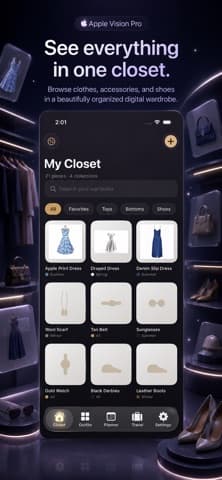
Wardrobe Vision shortens it rather than removing it. Snap or import from the photo library, and an automatic cutout lifts the garment onto a clean backdrop — that is the tedious part handled, and it is why the grid in the screenshot looks like a catalogue rather than a camera roll. Apple's Vision framework provides the subject-lifting capability that makes this practical on-device, which is also why it can run without a server.
What remains is tagging. The listing offers name, category, colour, season, occasion, brand, size, material, price and notes — ten fields per garment. Fill all ten for ninety items and you have spent a weekend. Fill two and the filters stop working.
The realistic approach is to tag only what you will filter by. Category and season are what the planner and the packing list actually use. Price matters only if you want cost-per-wear. Material and notes are for people who genuinely reference them, and most people do not.
What the planner and the packing list are for
These are the two features that pull the catalogue into daily use, and without daily use the catalogue decays.
The planner assigns an outfit to each day of the week and shows repeat-avoidance hints, so a garment worn on Monday is flagged when you reach for it on Thursday. The packing list is trip-shaped: create a trip with dates and a type — the screenshot shows chips for business, vacation and weekend — then add items and outfits and tick them off as they go in the bag. Trips can be duplicated, which is the right answer for anyone who takes the same three days away every month.
The catalogue is the cost. The planner and the packing list are the return, and only one of those is visible on day one.
- Photograph 10 items and use the planner for a week before paying anything.
- Duplicate a trip rather than building each packing list fresh.
- Archive off-season clothes instead of deleting them, so the wear history survives.
The insights only become interesting after a season of use, which is the honest timescale for judging whether this app suits you. A wardrobe catalogue is a slow instrument. It tells you nothing in week one and something worth knowing in month six, and that is a different bargain from most apps — where the value is meant to be obvious the first time you open them.
Frequently asked questions
- Does Wardrobe Vision need an Apple Vision Pro?
- No. The iPhone app catalogues clothes, builds outfits, plans a week and packs for trips on its own. The Vision Pro layouts are an addition for people who own the headset, not a requirement.
- Is my wardrobe uploaded anywhere?
- The listing says photos and wardrobe data stay on the device, with no cloud upload, no account and no tracking, and that background removal runs on-device. The practical consequence is that there is no backup, so a lost phone means a lost catalogue.
- What does the paid version cost?
- A one-time 19.99 dollars for Pro Lifetime, which lifts the 10-item limit and adds Collections. The listing states explicitly that there is no subscription and that the unlock syncs between iPhone and Vision Pro.
- Does it suggest outfits for me?
- No, and that is deliberate. The listing advertises having no AI: no stylist bots and no generated outfits. You assemble looks yourself from garments you have photographed.
Sources
- Wardrobe Vision: 3D Closet — App Store
- RealityKit — Apple Developer Documentation
- Human Interface Guidelines: Accessibility — Apple Developer
Published by
Skrill
Discover useful apps, software, AI tools, digital products, reviews, comparisons, alternatives, and practical recommendations.
About the publication