Lumora is a line puzzle you can play with your eyes
Hands-free control is usually an accessibility setting buried three menus deep. Here it is one of three ways the game expects to be played.
Short answer
Lumora is a connect-the-lights puzzle for iPhone with over 100 levels, playable by touch, by eye tracking or by face gestures. It carries no advertising and no subscription, charging a single one-time unlock instead.
On this page
The rules take one sentence. Connect each pair of glowing lights with a path, do not let the paths cross, and fill every cell. That is a flow puzzle, and there are hundreds of them.
Lumora is worth a second look for a different reason. It ships three ways to play — touch, eye tracking and face gestures — and treats the hands-free ones as ordinary modes rather than as an accessibility menu bolted on after launch.
Hands-free is a mode, not a setting
The distinction matters more than it sounds. An accessibility setting is something you enable once, buried under three menus, tested lightly and often broken by the next update. A play mode appears on the same screen as the others and gets the same attention.
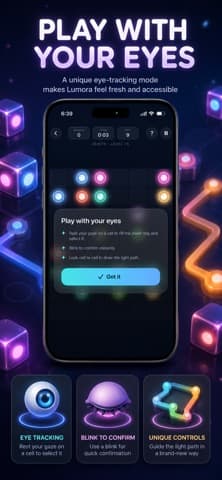
The listing's tutorial screen sets out the eye-tracking rules directly: rest your gaze on a cell to select it, blink to confirm, and the interface shows you the light path as you go. Three cards beneath it name the pieces — eye tracking, blink to confirm, and a control scheme built around them rather than adapted to them.
| Mode | Input | Suits |
|---|---|---|
| Touch | Finger on the grid | Everyone; the default |
| Eyes | Gaze to select, blink to confirm | Hands occupied, or hands unavailable |
| Face | Head and face gestures | Where a blink is impractical |
Apple's own accessibility guidance makes the case that alternative input should not cost a person the experience everyone else gets. A puzzle with no timer is unusually well suited to that, because gaze input is slower than a fingertip and here nothing punishes slowness.
What the puzzle actually asks of you
Fill every cell is the constraint that turns this from a maze into a puzzle. Connecting the pairs is usually easy; connecting them so that no square is left empty is the part that takes thought.
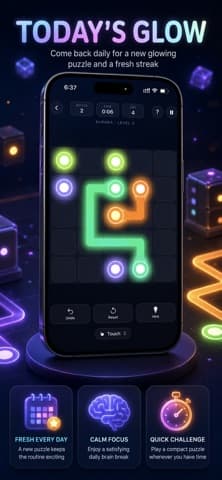
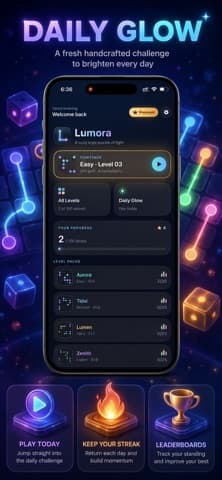
The listing claims over 100 hand-crafted levels that ease you in and grow harder, plus a Daily Glow puzzle to return to each day. The in-game screenshot shows a move counter and a timer running at three seconds, though the description is emphatic that there are no timers and no pressure — so the clock is presumably a record rather than a limit.
A puzzle with no clock is the rarest thing in a mobile store, because a clock is what sells a second attempt.
Does no advertising change the game?
More than people expect. A free casual puzzle usually funds itself by interrupting you, and the interruption shapes the design: levels get shorter, failure gets more frequent, and a rewarded video appears at the moment of frustration.
Removing that removes the incentive. The listing states no ads, no subscription, and a single one-time unlock. What you are buying is the absence of a business model that would otherwise be aimed at you, which for a game explicitly built for winding down before bed is the whole proposition.
- No timers, so a level can be abandoned mid-thought.
- No advertising, so no video between attempts.
- One purchase, rather than a subscription to a puzzle game.
The honest caveats
Three, and none of them are about the puzzle.
It requires iOS 17.0 or later, according to Apple's listing, which is a fairly recent floor for a casual game. Eye tracking depends on the front camera and on lighting — it is a gaze estimate, not a mind-reader, and a dim room will make it worse. And the App Store shows no ratings at all, on a version 1.0.1 released in June 2026, so there is no accumulated evidence about how well the hands-free modes hold up across all 100 levels.
The genre is also crowded, which cuts both ways. Plenty of flow puzzles are free and fine, and if all you want is the puzzle, you have options — a point our alternatives coverage makes regularly. What is not widely available is this puzzle without advertising and with a serious hands-free mode. If either of those is what you are looking for, the shortlist is short. Our best tools selections apply the same rule: a specialised choice has to win on the specialisation.
Why a puzzle is the right game for gaze input
Gaze control fails in most games for one reason: it is slow, and slowness in a game is usually punished. A shooter or a runner is a contest against a clock, and adding a half-second to every input turns a playable game into a frustrating one.
Lumora removes the clock. There are no timers and no failure states in the sense that matters — a path drawn wrongly is redrawn, and nothing is lost. That makes the extra half-second free, and it is why the eye-tracking mode here is a genuine way to play rather than a demonstration.
The second reason is the shape of the input. This puzzle needs one action, repeated: select a cell. It does not need aiming, dragging, timing or combinations. A control scheme that must express exactly one verb is the easiest possible target for gaze, and the tutorial reflects that — rest, then blink.
- No clock means slow input costs nothing.
- One verb means recognition has one job.
- Reversible moves mean a misread gaze is an inconvenience, not a loss.
What to test in the first ten minutes
Whatever mode you intend to use, the first session should be spent deliberately rather than on level one.
If you are there for eye tracking, test it in the lighting you will actually play in — an evening room with one lamp, not a bright office. Test it with glasses on if you wear them. And test it at the point where the grid gets dense, because selecting one cell among six neighbours is a harder ask of a gaze estimate than selecting one among two.
If you are there for the puzzle, skip ahead. The listing says the levels ease you in, so the first dozen will not tell you whether the difficulty curve suits you.
Test the hard case first. The easy case is what the screenshots already showed you.
The Daily Glow puzzle is worth a mention as the retention mechanism, and it is a gentle one — a single puzzle a day, with no streak pressure described in the listing. Compared with the usual apparatus of a free game, that is close to restraint.
Where it sits against the rest of the genre
Flow puzzles are one of the most thoroughly colonised categories on any app store, and almost all of them are free, advertising-funded and generated rather than designed. That is the comparison that matters.
Hand-crafted levels behave differently from generated ones. A generated grid is solvable but rarely elegant, and the difficulty wanders because nobody chose it. A hand-made set of 100 has a shape: an opening that teaches, a middle that tests, and a few late puzzles that are genuinely hard. Whether these 100 achieve that is not something a listing can prove, but it is the right thing to judge them on.
The presentation is doing work too. Soft light, gentle haptics and quiet tones are a deliberate register, and the listing is explicit that this is meant for before bed or a break. A puzzle game that does not want your evening is unusual enough to be the point. Our mobile apps coverage tends to find that the games worth keeping are the ones with the least interest in keeping you.
Frequently asked questions
- How does eye tracking work in Lumora?
- You rest your gaze on a cell to select it and blink to confirm, according to the in-game tutorial shown in the listing. It uses the front camera, so lighting and head position affect how well it tracks.
- Is Lumora free?
- It is a free download with a single one-time unlock, and the listing states there are no advertisements and no subscription. The free portion lets you try the puzzle and the control modes before deciding.
- How many levels are there?
- The listing claims more than 100 hand-crafted levels, plus a Daily Glow puzzle that changes each day. The levels are described as increasing in difficulty rather than being randomly generated.
- Which iPhones can run it?
- Apple's listing gives a minimum of iOS 17.0. The eye-tracking and face-gesture modes depend on the front-facing camera, so they will not work with the phone face-down or in the dark.
Sources
- Lumora: Cozy Line Puzzle — App Store
- Human Interface Guidelines: Accessibility — Apple Developer
- Web Content Accessibility Guidelines 2.1 — W3C
Published by
Skrill
Discover useful apps, software, AI tools, digital products, reviews, comparisons, alternatives, and practical recommendations.
About the publication