Ordava turns a WhatsApp chat into an invoice
Selling in direct messages means retyping every order. The pitch here is that the retyping is the part software should do.
Short answer
Ordava reads a conversation you paste or share from WhatsApp, Instagram, Messenger, TikTok, SMS or email and extracts the customer, items, quantities, address and payment method into an order with an invoice attached. It costs 4.99 dollars a month after a seven-day trial, and every extracted field is editable before you save.
On this page
If you sell through direct messages, you already know the loop. Read the message. Copy the name into a note. Copy the address. Work out the total. Write the invoice somewhere else. Remember, three days later, whether this one was paid.
Ordava is an iPhone and Android app that tries to delete that loop by reading the conversation itself. You share a chat from WhatsApp or Instagram, or paste the text, and it extracts the customer, the items, the quantities, the address, the phone number and the payment method into a draft order with an invoice attached.
The extraction step is the whole product
Everything else in the app is ordinary order management. The part that is either worth paying for or not is the step where a conversation becomes structured data.
The create-order screen in the listing shows what that looks like in practice. You pick the source — WhatsApp, Instagram, Facebook or TikTok are the four chips — then attach a screenshot or paste the text. The screenshot in the listing shows an attached file of about 27 KB marked "ready to extract", above a single button reading Extract with AI.
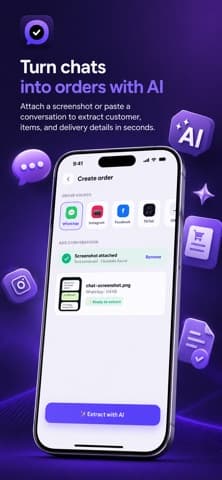
The listing also says the app classifies what the conversation is — an order, a subscription, a service booking, an appointment or an inquiry — and that when something is missing it drafts the follow-up message asking for it.
Which fields can you afford to let it guess?
This is the question that decides whether the app saves time or creates a slow-burning mess, and the answer is not the same for every field.
| Field | What a wrong value costs | Check before saving |
|---|---|---|
| Quantity | Wrong stock, wrong total | Always |
| Address | A failed delivery and a refund | Always |
| Price | Margin, silently | Always |
| Customer name | An awkward message | Skim |
| Payment method | A chased payment that already arrived | Skim |
| Item description | Very little | Rarely |
The pattern is that anything a customer will notice, or anything that touches money, is worth two seconds of your eyes. The listing is explicit that you review and edit every field before saving, which is the right default and worth actually using rather than tapping past.
Extraction is a typist, not a bookkeeper. It saves you the keystrokes, not the responsibility.
What the dashboard is actually tracking
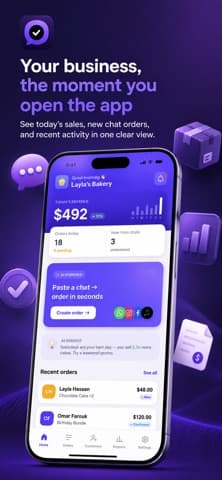
The home screen is a small business summary rather than a feature list, and the sample figures show what it considers important: sales today, order count, how many are pending, and how many chats have been processed.
In the listing screenshot that reads 492 dollars in sales, 18 orders today with 1 still pending, and 3 new chats handled. Beneath it sits a line of AI commentary suggesting that Saturdays perform best and a weekend promotion might be worth trying, and then the recent orders themselves — a 48 dollar cake order and a 120 dollar bundle marked confirmed.
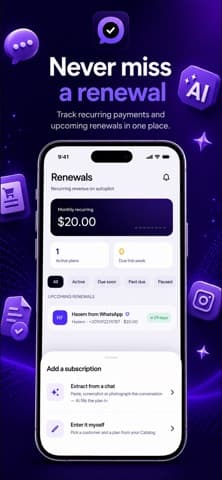
Recurring revenue gets its own treatment. The listing describes subscription and membership tracking, renewal reminders, ready-to-send renewal messages, and monthly recurring revenue with renewal rates. For a business selling memberships through chat, that is the part with no manual equivalent that works.
Is the subscription worth it?
Ordava is free for seven days, then 4.99 dollars a month. That is a low enough number that the calculation is simple: it pays for itself if it saves roughly fifteen minutes a month, which one busy afternoon would cover.
The harder question is lock-in. The app holds your customers, order history, balances and lifetime values, and the listing says data is synced to the cloud. Before a catalogue of several hundred customers lives there, find out how it comes back out — an export is the difference between a tool you use and a tool you are stuck in. We treat that as a standing question in our software coverage, and it applies here as much as to anything larger.
- Seven days is short for a business with weekly rhythms. Run it across two weekends if you can.
- Test it on a messy chat, not a tidy one. The value is in the conversations that ramble.
- Test it in the language you sell in. The listing claims full English and Arabic with proper right-to-left layouts.
Two things to check before you commit
The Arabic support looks genuine rather than bolted on. The listing describes true RTL layouts, invoices generated in your language, and renewal messages in English or Arabic. For a seller in the Gulf or North Africa taking orders in Arabic, that is not a small detail — most invoicing tools handle Arabic text badly or not at all, which is a recurring theme in our comparisons.
The second thing is less encouraging. At the time of writing, the Terms of Use and Privacy Policy links published in the App Store listing point at a domain that does not resolve — checked against both Google's and Cloudflare's public DNS. The App Store's own EULA link works, and the app may well be fine, but the documents describing what happens to your customers' data are currently unreachable. For an app that syncs a customer list to a server, that is worth resolving before you migrate a business onto it.
Version 1.0.2 is current, updated at the end of August 2026, with no ratings on either store yet.
What happens to an order once it exists
The extraction step gets the attention, but an order that cannot be followed to completion is just a nicer way of retyping. The listing describes the rest of the loop in some detail.
Orders carry statuses, payment tracking, delivery dates and late alerts. Customers get profiles with order history, outstanding balances and lifetime value. Products, services, subscriptions and memberships share one catalogue. Invoices are generated as PDFs in your language and branded with your logo, and customers can open an order-tracking link without installing anything.
That last point is the quietly sensible one. Asking a customer to install an app to see whether their cake is coming is a request most will decline, and a plain web link avoids the whole problem.
Reporting sits on top: a daily summary of revenue, new orders and pending payments, then reports on sales, customers, products and subscriptions. For a business currently running on a notes app, having any of this is the change; which reports exist matters much less than whether the orders get entered consistently.
The questions worth asking during the trial
Seven days is enough to answer four things, and they are not the four the listing leads with.
- How does it handle your worst chat? A conversation with three changes of mind and a corrected address is the real test.
- Does the invoice look right? Your logo, your currency, your language, your tax line if you have one.
- What happens when it guesses wrong? Editing should be quick, because you will be doing it.
- Where does the data go? It syncs to a server, which is a different privacy posture from the on-device apps we cover in mobile apps.
Subscriptions billed through the stores follow the platform's rules rather than the developer's, and Apple sets those out in its subscription documentation — including that a renewal happens automatically unless it is cancelled at least 24 hours before the period ends. Diary the trial's end date on the day you install it.
Frequently asked questions
- Does Ordava read my chats automatically?
- No. You share a conversation into the app or paste it in, one at a time. It has no background access to your messaging apps, and the listing describes attaching a screenshot or text rather than connecting an account.
- What does it cost?
- The listing states a seven-day free trial, then 4.99 dollars a month, cancellable at any time. It is billed through the app stores, so the usual renewal rules apply — cancel at least 24 hours before the period ends.
- Does it work in Arabic?
- The listing claims full Arabic support with true right-to-left layouts, invoices in your language, and renewal messages in English or Arabic. That is more than most invoicing apps offer, though only a trial in your own workflow will confirm the quality.
- Can I get my data out?
- The listing does not describe an export, and it says data is synced to the cloud. Ask about export before you move a real customer list in, because a catalogue you cannot retrieve is the expensive kind of lock-in.
Sources
- Ordava: Invoice & Order Maker — App Store
- Ordava on Google Play — Google Play
- Auto-renewable subscriptions — Apple Developer
Published by
Skrill
Discover useful apps, software, AI tools, digital products, reviews, comparisons, alternatives, and practical recommendations.
About the publication