SchoolReady AI splits one supply list across three children
The school list is not hard to read. It is hard to hold three of them at once, against a budget, in August.
Short answer
SchoolReady AI imports a school supply list from a photo, pasted text or a PDF, sorts the items into categories, and tracks what has been bought and packed for each child against a budget. It is free, with an optional Pro tier for unlimited imports.
On this page
The school supply list is not a difficult document. It is a difficult situation: three lists, three children, one shop, one budget, and a deadline that everybody in the country hits in the same fortnight.
SchoolReady AI is an iPhone app that imports those lists — by photo, pasted text or PDF — categorises the items automatically, and then tracks buying, packing and spending separately for each child. The import is the marketing; the per-child split is the part that does the work.
What the home screen chooses to show
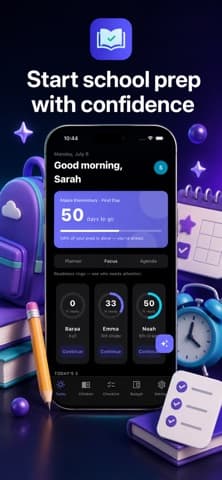
You can read an app's opinion off its first screen, and this one shows four things: who you are, how long you have, how far along you are, and which child is behind.
The listing screenshot has a countdown reading 50 days to the first day at Maple Elementary, a progress line saying 58 per cent of prep is done, and then three children with readiness figures — 0 per cent, 33 per cent and 50 per cent — each with a Continue button. Under a heading noting who needs attention.

The child at 0 per cent is the entire point. A single shared list hides that; three separate checklists with a percentage against each do not.
Where does the budget number come from?
From you, and this is the feature that will either be used or ignored within a week.
The budget screen in the listing shows 150.73 dollars remaining of a 450 dollar season budget, with 299.27 already spent and 237.94 still to buy. Below that, spending is broken out per child.
| Child | Spent | Allocated | Status |
|---|---|---|---|
| Emma | 190.47 | 150.00 | Over by 40.47 |
| Noah | 108.80 | 150.00 | Within budget |
That table is the honest version of a conversation most families have in September rather than August. Note that the figures only work if every expense is entered, which is the usual weakness of budgeting features — the app cannot see your card.
A budget tracker is a diary, not a meter. It knows only what you told it.
Is the AI import worth anything?
It saves typing, and typing is a real cost when a list runs to thirty items with quantities and specific brands.
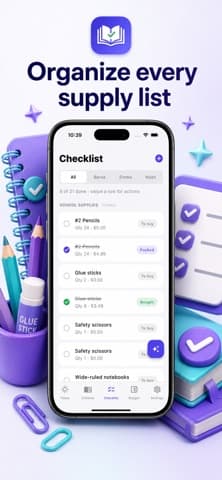
Photo, paste or PDF covers how these lists actually arrive: a photograph of a sheet from the school gate, a message forwarded in a parents' group, or an attachment on an email. Automatic categorisation then groups them so the shop trip is organised by aisle rather than by the order the school typed them.
What it cannot do is resolve ambiguity. "A4 squared exercise book, 5mm" is precise; "art supplies as discussed" is not, and no import step fixes that. The listing also mentions class-list comparison, which is the more interesting claim — spotting where two children's lists overlap so you buy the multipack once.
- Free covers the core, according to the listing, with Pro adding unlimited imports.
- One import per list is all most families need, which makes the free tier plausible for a single child.
- Three children and three schools is where the import limit starts to matter.
When a shared note is enough
Honestly: one child, one list, one shop. A note shared with the other parent, with items ticked off, costs nothing and syncs everywhere. The overhead of a dedicated app is not repaid.
The app earns its place at two or more children, or where the budget genuinely binds and you want the spending split visible rather than argued about. That is a narrow but real audience, and it is the same test we apply across our best tools coverage — a specialised app has to beat the general one at the specific thing.
Two limits to note. It is iPhone only, so a household coordinating across an Android phone cannot share it. And version 1.0.1 was released in July 2026 with no ratings yet, meaning there is no second opinion available — a seasonal app is also one you find out about once a year, which makes the comparisons harder than usual.
What the import can and cannot read
Reading a photographed sheet of paper is text recognition, and it is one of the more reliable things a phone does. Apple exposes it to developers through the Vision framework, which handles printed text well and handwriting far less well.
That distinction predicts where this app will disappoint. A printed list from a school office should import cleanly. A list handwritten on a whiteboard and photographed at an angle will not, and a photograph of a photograph in a parents' group chat is worse again.
The second limit is interpretation rather than recognition. Reading the characters is easy; deciding that "2 x A4 80gsm" is a quantity of two, a product of A4 paper, and a specification of 80gsm is the harder step, and quantities are exactly where a wrong guess costs money at the till. Check quantities against the original sheet before shopping, every time.
- Printed lists import well.
- Handwritten lists need checking line by line.
- Quantities and sizes are worth verifying whatever the source.
The three features that decide whether it sticks
A seasonal app has about a fortnight to prove itself, so it is worth knowing which parts do the work.
The countdown is motivational rather than functional, and it is the first thing to stop noticing. "Today's 3" is the opposite — three prioritised items is a decision the app makes for you, and reducing a thirty-item list to three is genuinely the hard part of the fortnight.
Class-list comparison is the one with no manual equivalent. Two children at the same school frequently need the same items, and spotting the overlap before you buy two of everything is real money — the difference between two packs of pens and one. The listing names it, and it is the feature most worth testing during the free tier.
The value of a back-to-school app is not organisation. It is the multipack you did not buy twice.
Reminders sit somewhere in between. Useful in the last week, irritating in the first, and the sort of thing to turn down rather than off. All of which is to say the app is doing planning work rather than shopping work, and our best tools coverage is consistent about which of those a specialised app has to win at.
One structural caution before you commit a season to it. Everything here is organised around a school year, so the data you enter has a natural expiry date, and an app you open for six weeks a year is one whose password you will have forgotten by the following July. Check that last year's lists and budgets are still readable when you come back, because the second season is where a seasonal app either saves you real time or turns out to be a fresh setup every August.
Frequently asked questions
- Is SchoolReady AI free?
- The listing describes it as free with an optional Pro tier that adds unlimited imports. The checklist, per-child tracking, budget and countdown are presented as part of the free app.
- What formats can it import a supply list from?
- Photo, pasted text or PDF, according to the listing. That covers the three ways these lists usually arrive — a photograph of a printed sheet, a forwarded message, or an email attachment.
- Does it work for more than one child?
- Yes, and that is where it earns its place. Each child gets a separate checklist with its own readiness percentage, and the budget screen breaks spending down per child.
- Is there an Android version?
- No. The listing is iPhone only, which matters if two parents are coordinating from different platforms. A shared note may be the more practical option in that case.
Sources
- SchoolReady AI: Supply List — App Store
- App Store Review Guidelines — Apple Developer
- Vision framework — Apple Developer Documentation
Published by
Skrill
Discover useful apps, software, AI tools, digital products, reviews, comparisons, alternatives, and practical recommendations.
About the publication