TapMemo: a voice note that arrives as a written note
Recording an idea is easy. Finding it again three weeks later is the part that fails, and that is the part this app is aimed at.
Short answer
TapMemo records a voice note from an Apple Watch or iPhone and returns a transcript with a title, a summary and extracted action items. Recording time is metered in minutes per month, from 5 on the free tier up to 10,000 on the largest plan, and the app states that audio is deleted after 30 days while transcripts remain.
On this page
The problem with voice memos was never capture. Every phone has recorded audio for fifteen years. The problem is that a folder of forty untitled recordings is a worse archive than no archive, because you cannot search a waveform and you will not listen to forty of them to find one sentence.
TapMemo is an iPhone and Apple Watch app that attacks the retrieval half rather than the capture half. You tap, you speak, and what comes back is a transcript with a generated title, a summary and a list of action items pulled out of what you said.
What the recording screen actually shows
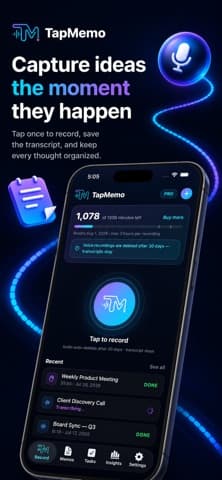
The listing screenshots are specific in a way that descriptions usually are not, and two details on the main screen tell you most of the model.
The first is a balance: 1,078 of 1,200 minutes left, with a Buy more button beside it. The second is a notice sitting directly under it, stating that voice recordings are deleted after 30 days while transcripts stay. Below both, a large record button, and a list of recent memos — one marked Done, one still transcribing.
Both details point the same way. Minutes are metered and audio is transient, which means transcription happens on a server and the transcript is the thing the product actually keeps.
What do the plans cost in minutes?
The listing sets out the tiers plainly, and the numbers are the clearest way to work out whether it fits your week.
| Plan | Recording minutes each month |
|---|---|
| Free | 5 |
| Pro | 300 |
| Plus | 1,000 |
| Max | 3,000 |
| Scale | 10,000 |
Five free minutes a month is an evaluation allowance, not a usage tier. Pro's 300 minutes is five hours, which covers a habit of two or three short captures a day with room to spare. The larger plans are priced for recording meetings rather than thoughts, and the screenshot showing a 35-minute "Weekly Product Meeting" suggests that is an intended use.
Plans are auto-renewing subscriptions billed through the App Store, so the cancellation rules are Apple's rather than the developer's — Apple documents the mechanics, including that a subscription renews unless it is cancelled at least 24 hours before the period ends.
Why does the wrist matter more than the phone?
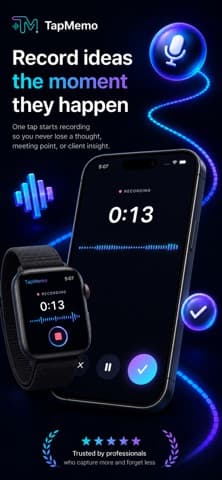
Because the capture window is about four seconds long. An idea that arrives while you are walking survives only if recording it costs less attention than continuing to think about it.
Taking a phone out, unlocking it, finding an app and pressing record is perhaps eight seconds and a full context switch. A tap on a watch face is one gesture. The listing leans on this deliberately, and the Apple Watch screenshot shows the same recording running on both devices, syncing to the phone afterwards.
A capture tool is judged by what it collects on the days you are too busy to use it properly.
That is also the honest test to apply during a trial. Do not evaluate it at your desk, where a notes app is already open and better.
The 30-day deletion is a feature and a constraint
Audio disappearing after 30 days is unusually clear for a listing, and it cuts both ways. It limits how long a recording of your voice sits on someone's server, which is the reassuring reading. It also means the transcript is the only copy after a month, so a mis-transcribed name or figure becomes uncorrectable.
- Check names and numbers early, while the audio still exists to check against.
- Export anything that matters rather than treating the app as an archive.
- Assume the transcript is the record, because after 30 days it is.
Where it is the wrong tool
Three cases, and they are common enough to name.
Recording other people in a meeting is a legal and social question before it is a product one, and the answer varies by jurisdiction. Long-form interviews will consume a plan quickly at 60 minutes each. And anything confidential is being sent to a transcription service, which the privacy policy covers and your employer's policy may not permit.
For everything else — the idea on the walk, the follow-up you thought of in a corridor — the shape is right. Version 1.0.5 is current, and the App Store shows no ratings yet, so the trial minutes are the only evidence available. Our wider text tools coverage looks at what to do with the transcripts once you have them.
What comes back is more than a transcript
The five tabs along the bottom of the app tell you what it thinks it is: Record, Memos, Tasks, Insights and Settings. Two of those are the interesting ones.
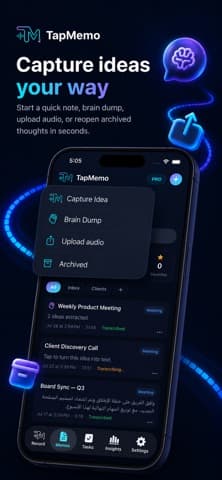
Memos is the archive, and the screenshots show entries with a generated title, a timestamp, a duration and a status — Transcribed, Transcribing, or Meeting. One memo in the listing reads "2 tasks extracted", which is the Tasks tab being fed automatically rather than by hand. Another screenshot shows a memo transcribed in Arabic, so the transcription is not English-only.
That extraction step is the actual product. A transcript is a wall of text and only slightly more searchable than audio. A title, a two-line summary and three extracted actions are something you can scan in a list of forty.
It is also the part most likely to be wrong. Extraction guesses at intent, and a musing sentence can become a task you never meant to commit to. Treat the Tasks tab as a suggestion queue rather than a to-do list, at least until you have seen how it reads your speech.
The four ways in
The capture menu offers Capture Idea, Brain Dump, Upload audio and Archived, and the distinction between the first two is worth understanding.
- Capture Idea is the single thought, the default, the four-second use.
- Brain Dump is the rapid-fire mode for when several things arrive at once and sorting them later is the point.
- Upload audio brings in a recording made elsewhere, which is how an existing backlog gets processed.
- Archived is where finished items go, so the main list stays a working list.
Upload is the quietly useful one. It means the app can process the folder of untitled voice memos you already have, which is the archive problem that started this — though at 5 free minutes a month, working through a backlog is a paid activity. Our productivity coverage treats that as the honest cost of any metered tool.
Decide what the app is for before you subscribe
The two uses in the listing pull in different directions, and a plan that suits one is wrong for the other.
Idea capture is short and frequent: twenty seconds, several times a day, perhaps 15 minutes a month. The free tier does not cover that, but Pro at 300 minutes covers it many times over. Meeting capture is long and scheduled: four hour-long meetings a week is roughly 960 minutes, which lands on Plus or above.
Buying a meeting-sized plan and using it for ideas wastes most of it. Buying an idea-sized plan and recording a workshop exhausts it in one sitting. Work out which one you are actually doing during the free five minutes, and if the answer is both, price the meetings and treat the ideas as the rounding error. The guides section covers the same arithmetic for other metered tools.
Frequently asked questions
- Does TapMemo work without an Apple Watch?
- Yes. The watch is the fastest way in, but the listing shows recording, upload and browsing on the iPhone as well. The watch app syncs to the phone rather than replacing it.
- What happens to my recordings after 30 days?
- The app's own screen states that voice recordings are deleted after 30 days and transcripts are kept. Correct anything important while the audio still exists, because after that the transcript is the only record.
- Is transcription done on the device?
- Almost certainly not. Recording time is metered in minutes and sold in monthly plans, which is how server-side transcription is billed. On-device processing would not need a meter.
- How much can you do on the free tier?
- Five recording minutes a month, according to the listing. That is enough to test the transcript quality on your own voice and accent, which is the only test worth running before paying.
Sources
- TapMemo: AI Voice Recorder — App Store
- TapMemo privacy policy — Loopara
- Auto-renewable subscriptions — Apple Developer
Published by
Skrill
Discover useful apps, software, AI tools, digital products, reviews, comparisons, alternatives, and practical recommendations.
About the publication